GitOps
Deploy Three Go Services to GKE with Argo CD
A first-sync field guide: three Gin services, two repos, Argo CD on GKE, and four failures between README and green apps.
- #gitops
- #kubernetes
- #gke
- #argo-cd
- #golang
- #helm
AI Summary
Get a quick overview
Three Go services on GKE, deployed from Git, reconciled by Argo CD. No kubectl apply from my laptop for app rollouts. Bootstrap once: install Argo CD and apply the Application CRDs. After that, image and config changes go through git. That was the goal.
Clone both repos if you want to run the lab:
| Time | ~2–3 h first run; ~45 min if you know GKE |
| Cost | A few dollars per day if you leave the cluster up |
| You need | gcloud, kubectl, Docker, a GCP project with billing |
| You get | Three Argo apps Synced, one GitOps image tag bump, working Ingress curl |
Not for: production hardening, multi-environment overlays, or automated registry-to-git tag bumps. This is a first-sync lab.
This post walks through the setup, then the failures I hit on a real first deploy. If you know kubectl basics you are fine. If GKE, Helm, or Argo CD are new to you, there are short notes along the way where they matter.
The Go project
hello-gke-services is a small learning stack. Three separate Go modules, each a single-file Gin server. No shared library, no database. Deliberately boring so the interesting part is deploy plumbing, not app logic.
| Service | Port | Role |
|---|---|---|
frontend | 8080 | Public entrypoint. GET / calls the api over HTTP and returns combined JSON. |
api | 8081 | GET /api/hello returns a JSON greeting. This is what you change in the GitOps update section. |
worker | 8082 | Background-ish service. Health endpoint only, runs in the cluster but has no Ingress. |
If Ingress is new to you: it is the Kubernetes object that exposes HTTP routes from outside the cluster to a Service inside it. Worker never gets one in this lab. It just proves a third Deployment can coexist under the same GitOps flow.
Layout:
hello-gke-services/
├── services/
│   ├── frontend/    # Dockerfile, main.go, go.mod
│   ├── api/
│   └── worker/
├── docker-compose.yml   # local smoke test
├── Makefile             # docker-build, docker-push
└── .github/workflows/   # optional CI to GAR
frontend reads API_URL (default http://api:8081) to reach the api inside the cluster. Images are distroless multi-stage builds.
That repo owns what runs. It does not know about Helm, Argo, or your cluster.
The gitops repo
hello-gke-gitops owns where and how those images run. Kubernetes YAML (via Helm templates), environment config, and Argo CD wiring all live here.
The hello-gke AppProject scopes which namespaces and repos Argo CD may touch. All three apps deploy into the hello-gke namespace. Image tags and ingress host live in environments/dev/*-values.yaml; charts under apps/<service>/helm stay generic.
Why two repos
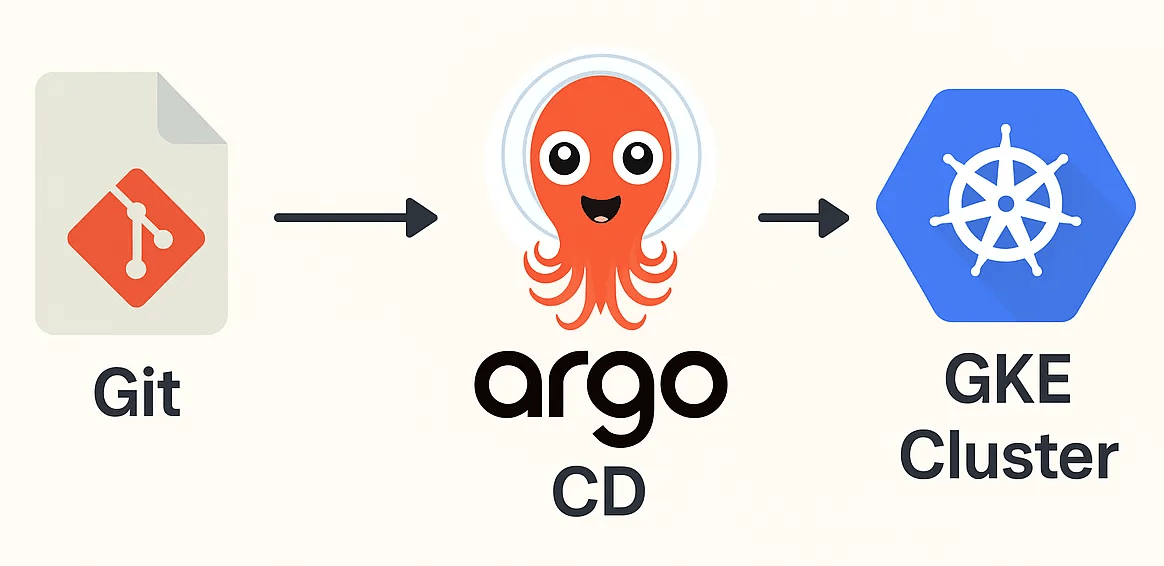
Splitting app code from deploy config is the whole point of GitOps: the cluster should match a git branch, and something should continuously pull it toward that state.
That "something" here is Argo CD. You install it once on the cluster. It polls your gitops repo, runs helm template under the hood, and applies the result with the Kubernetes API. You stop hand-applying manifests when you want a deploy to stick.
The services repo changes when you edit Go handlers, Dockerfiles, or CI. The gitops repo changes when you bump image tags in environments/dev/*-values.yaml, replica counts, ingress hosts, or chart templates. Argo CD only watches the second repo. Your cluster state tracks git, not whatever image happened to be on your laptop last Tuesday.
A typical deploy touches both: merge a code change in hello-gke-services, build and push a new image tag, then merge a one-line tag bump in hello-gke-gitops. Argo does the rest.
Nothing in this lab auto-updates api-values.yaml when you push a new image. You still bump the tag by hand (or wire CI later). GitOps reconciles cluster ↔ git, not registry ↔ git. That gap is where Argo CD Image Updater, Cloud Build triggers, or Renovate show up on real teams.
GitOps is not CI
People mix them up because both touch git and pipelines. Different jobs.
CI (the optional workflow in hello-gke-services) runs on a code push: test, build, push an image to Artifact Registry. It produces artifacts. It does not decide what runs in the cluster.
GitOps is what Argo CD does here: watch the gitops repo and make the cluster match it. The deploy decision is a commit that changes tag: v2 in api-values.yaml. Argo reconciles that intent.
A full loop needs both halves unless you docker build && docker push by hand like this lab. Pushing a new image to GAR does nothing to GKE until git changes and Argo syncs. Hand-bumping values files feels tedious because you are standing in for the promotion step CI has not wired yet.
| CI | GitOps (Argo CD) | |
|---|---|---|
| Trigger | Code push or PR merge | Change in the gitops repo |
| Output | Image in the registry | Cluster state matches manifests |
| Owns | Build and test | What runs, where, at which tag |
kubectl apply | Argo CD | |
|---|---|---|
| Source of truth | Your laptop | Git branch |
| Drift | Stays until someone fixes it | selfHeal reverts manual edits |
| Rollback | "What did I apply?" | git revert on the gitops repo |
That separation also keeps RBAC sane. App developers do not need cluster credentials to propose a deploy. They merge a values file change. Argo reconciles.
Repo layout in hello-gke-gitops:
hello-gke-gitops/
├── apps/                    # Helm charts per service
├── environments/dev/        # Environment-specific values
├── argocd/applications/     # Argo CD Application CRDs
├── argocd/projects/
└── bootstrap/argocd/
Each service gets a chart under apps/<name>/helm and a values file under environments/dev/<name>-values.yaml. Helm here is just templated YAML: charts hold the shape of a Deployment/Service/Ingress, values files fill in image tags and replica counts. Argo Applications in argocd/applications/ point at a chart path, pass in the right values file, and target the hello-gke namespace (a logical bucket inside the cluster for these three apps).
Architecture
Traffic hits a GCE Ingress, lands on frontend, which calls api over ClusterIP. worker stays internal. Only the frontend chart defines an Ingress resource.
ClusterIP means the Service has a stable in-cluster IP/DNS name (api, frontend, worker) reachable only from inside the cluster. That is why frontend can call http://api:8081 without a public URL for api.
User → Ingress → frontend:8080 → api:8081
                          worker:8082 (internal, no Ingress)
When you curl the frontend from outside, you are really testing two hops: ingress routing, then frontend-to-api service discovery inside the cluster.
Git flow:
- Build and push images from
hello-gke-servicesto Artifact Registry. - Point image tags in
hello-gke-gitops/environments/dev/*-values.yaml. - Argo CD watches the gitops repo, renders Helm, applies to the
hello-gkenamespace.
Automated sync with selfHeal: true means manual kubectl edits get reverted. That is the point. I learned that the hard way when I kubectl set image to debug an arm64 crash and Argo put it back thirty seconds later.
Setup
1. Create the cluster
GKE is Google's managed Kubernetes. You get a control plane plus worker nodes; you do not install etcd or the API server yourself.
gcloud config set project my-gcp-project

gcloud container clusters create hello-gke \
  --zone us-central1-a \
  --num-nodes 2 \
  --machine-type e2-medium

gcloud container clusters get-credentials hello-gke --zone us-central1-a
The last command writes kubeconfig entries so kubectl talks to your cluster instead of minikube or docker-desktop.
On macOS with Homebrew gcloud, you may need the GKE auth plugin on your PATH before kubectl works:
source "$(brew --prefix)/share/google-cloud-sdk/path.zsh.inc"Add that line to ~/.zshrc so new terminals do not break.
2. Push images to Artifact Registry
Watch for pitfalls: ARM vs amd64, ImagePullBackOff.
Artifact Registry is GCP's container image store (think Docker Hub, but private to your project). GKE pulls from here at pod startup.
From hello-gke-services. The Makefile builds all three services and tags them under one registry prefix:
gcloud artifacts repositories create hello-gke \
  --repository-format=docker \
  --location=us-central1

make docker-push REGISTRY=us-central1-docker.pkg.dev/my-gcp-project/hello-gke TAG=dev
That produces three images: frontend:dev, api:dev, worker:dev. On Apple Silicon, make docker-push alone builds arm64 images unless your Makefile passes --platform linux/amd64 (the repo does on macOS). GKE nodes are amd64. More on that in the pitfalls section.
Fork and push (gitops). Fork hello-gke-gitops on GitHub and clone your fork. Argo reads GitHub, not your laptop.
- In
argocd/applications/*-dev.yaml, setrepoURLto your fork (each file has a comment on that line). - In
environments/dev/frontend-values.yaml,api-values.yaml, andworker-values.yaml, replacemy-gcp-projectwith your GCP project ID. Setimage.tagto match what you pushed (e.g.devfor all three). - Commit and push to
mainon your fork before Argo syncs:
git add environments/dev argocd/applications
git commit -m "chore: set project ID and fork repoURL"
git push origin main
3. Install Argo CD
Argo CD runs inside the cluster in its own argocd namespace. You use it to register Applications: each Application is one "deploy this git path to this cluster namespace" rule.
Follow bootstrap/argocd/install.md in the gitops repo. Helm install into the argocd namespace, grab the admin password, port-forward or LoadBalancer to the UI.
I used a LoadBalancer for the lab. Fine for learning. Lock it down or switch to port-forward before you forget it exists.
4. Apply Applications
From your gitops fork clone (after the commit and push in step 2):
kubectl apply -f argocd/projects/hello-gke.yaml
kubectl apply -f argocd/applications/
That creates three Argo CD Applications: api-dev, frontend-dev, worker-dev. One per microservice. You could kubectl apply the rendered manifests directly, but then nothing watches git for drift. These Application CRDs hand that job to Argo.
Each Application points at a Helm chart under apps/<service>/helm and pulls values from environments/dev/. Example for api-dev:
spec:
  source:
    repoURL: https://github.com/kubeboiii/hello-gke-gitops.git
    targetRevision: main
    path: apps/api/helm
    helm:
      valueFiles:
        - ../../../environments/dev/api-values.yaml
  syncPolicy:
    automated:
      prune: true
      selfHeal: true
Note the ../../../ in valueFiles. I got that wrong the first time. See below.
Snippet truncated. The full api-dev.yaml in the repo also sets destination.namespace: hello-gke, project: hello-gke, and CreateNamespace=true.
5. Confirm green status
Watch for pitfall: GCE Ingress Host header.
In the Argo UI, Synced means live cluster state matches git. Healthy means workloads pass health checks (here, HTTP /health probes on each pod).
When sync succeeds, all three apps look like this:
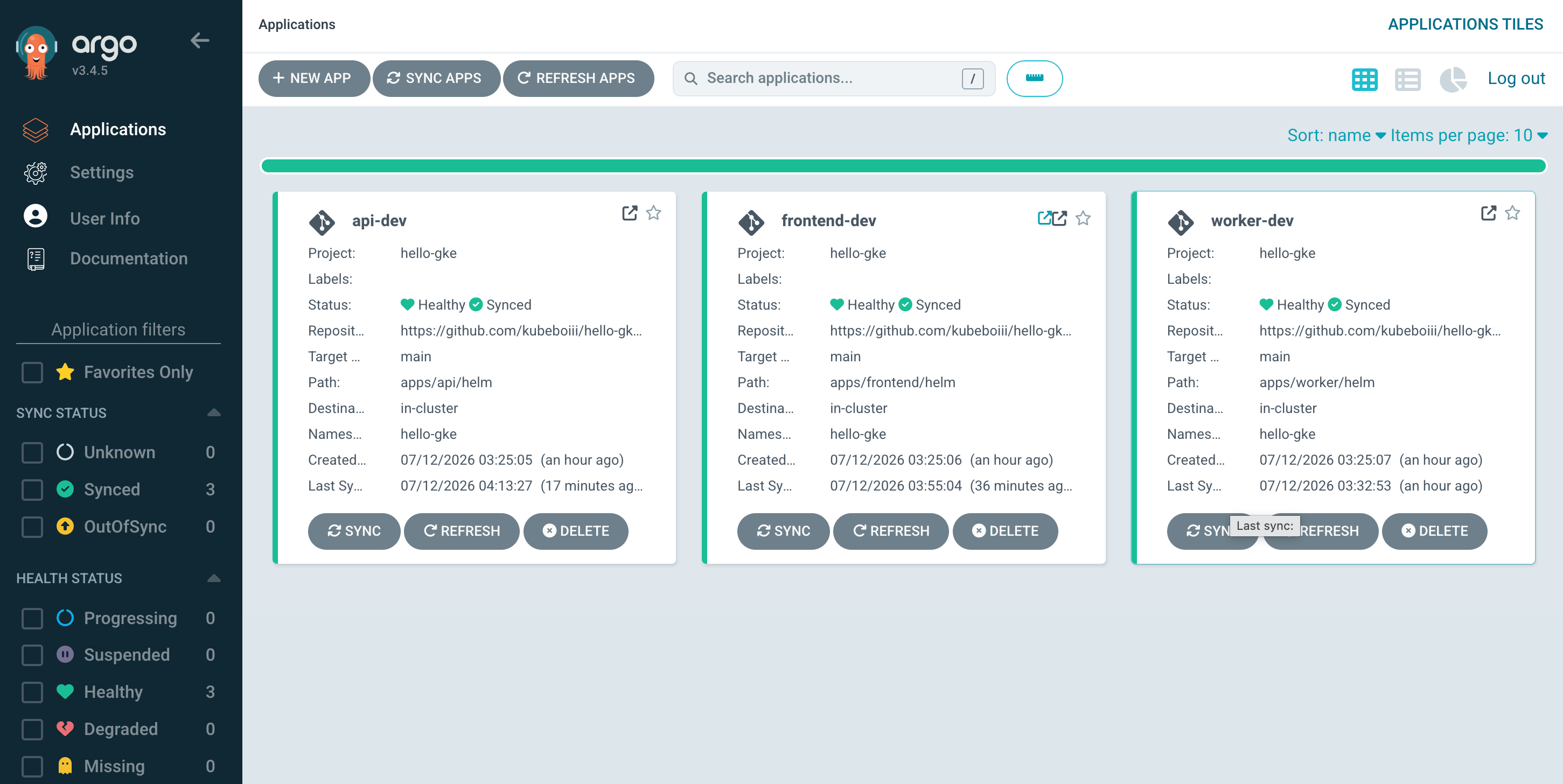
Three Applications in Argo CD: api-dev, frontend-dev, and worker-dev, all Synced and Healthy.
kubectl get pods -n hello-gke
kubectl get ingress -n hello-gke
Wait for an external IP on the frontend Ingress. GCE can take a few minutes. The Ingress controller provisions a Google load balancer; kubectl get ingress shows the IP when it is ready.
End-to-end curl from outside the cluster needs a Host header on GCE Ingress. Do not curl the bare IP yet. See GCE Ingress wants a Host header and the verification checklist below.
What broke
These showed up during first sync, not after a tidy green dashboard. Order here is symptom lookup, not the clock.
Four issues ate most of the afternoon. Symptom, cause, fix.
Wrong Helm valueFiles path
Symptom: Argo app stuck or failing sync. Error about apps/environments/dev/api-values.yaml not found.
Cause: Application manifests live in argocd/applications/. Helm charts live in apps/api/helm. Values live in environments/dev/. Argo resolves valueFiles relative to the chart path, not the Application file. From apps/api/helm, you need three ../ segments to reach the repo root, then environments/dev/.... I used two.
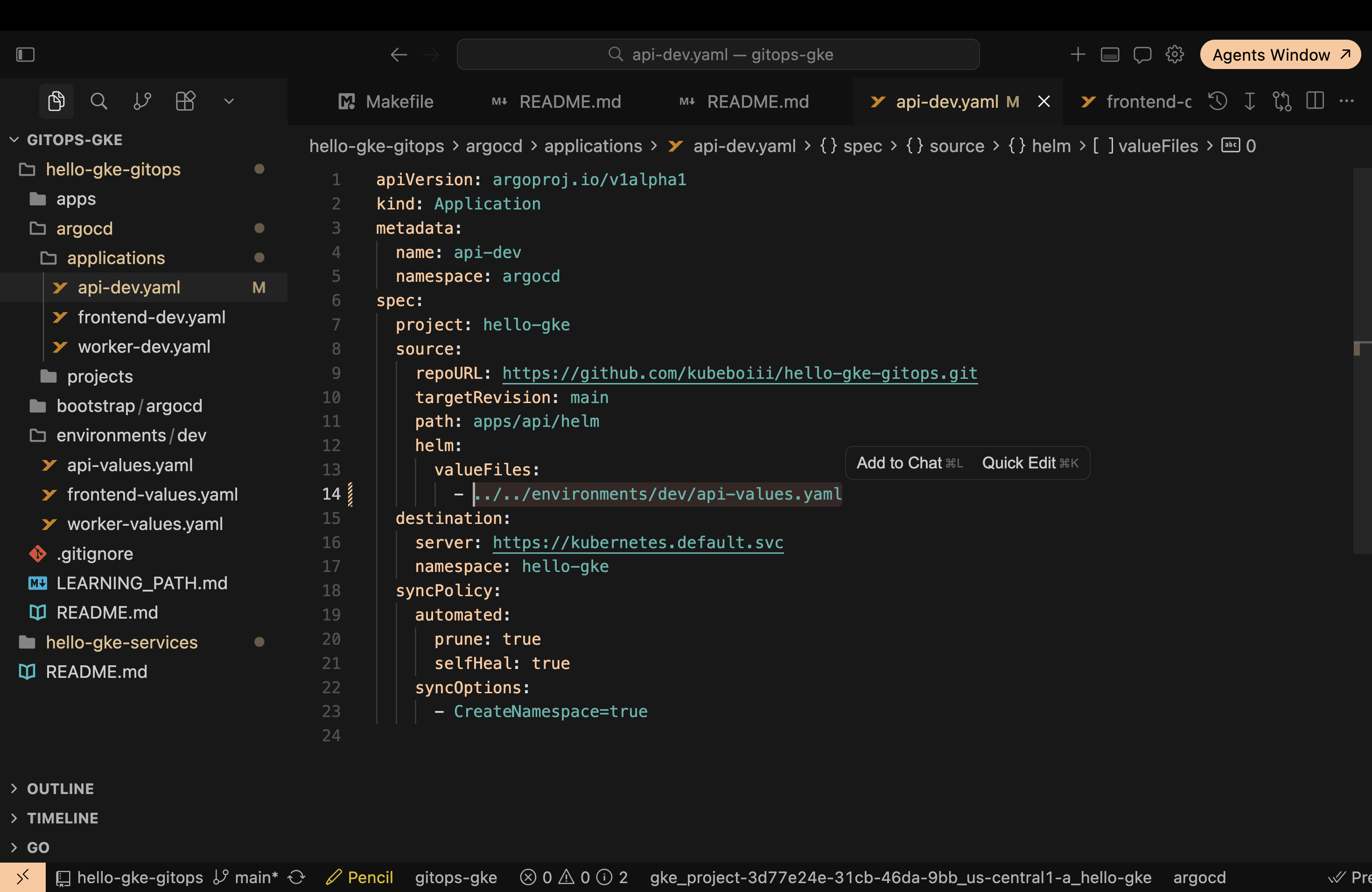
The bug: valueFiles used ../../ instead of ../../../ from the Helm chart path.
| Path | |
|---|---|
| Wrong | ../../environments/dev/api-values.yaml |
| Fixed | ../../../environments/dev/api-values.yaml |
From apps/api/helm, you need three ../ to reach the repo root. Fix all three Application files (api-dev, frontend-dev, worker-dev), commit, push. Fixed in commit 6491328 (update chart path).
ImagePullBackOff
Symptom: Pods in ImagePullBackOff. Kubernetes tried to start the container but could not download the image. GCP Error Reporting fills up with ErrImagePull.
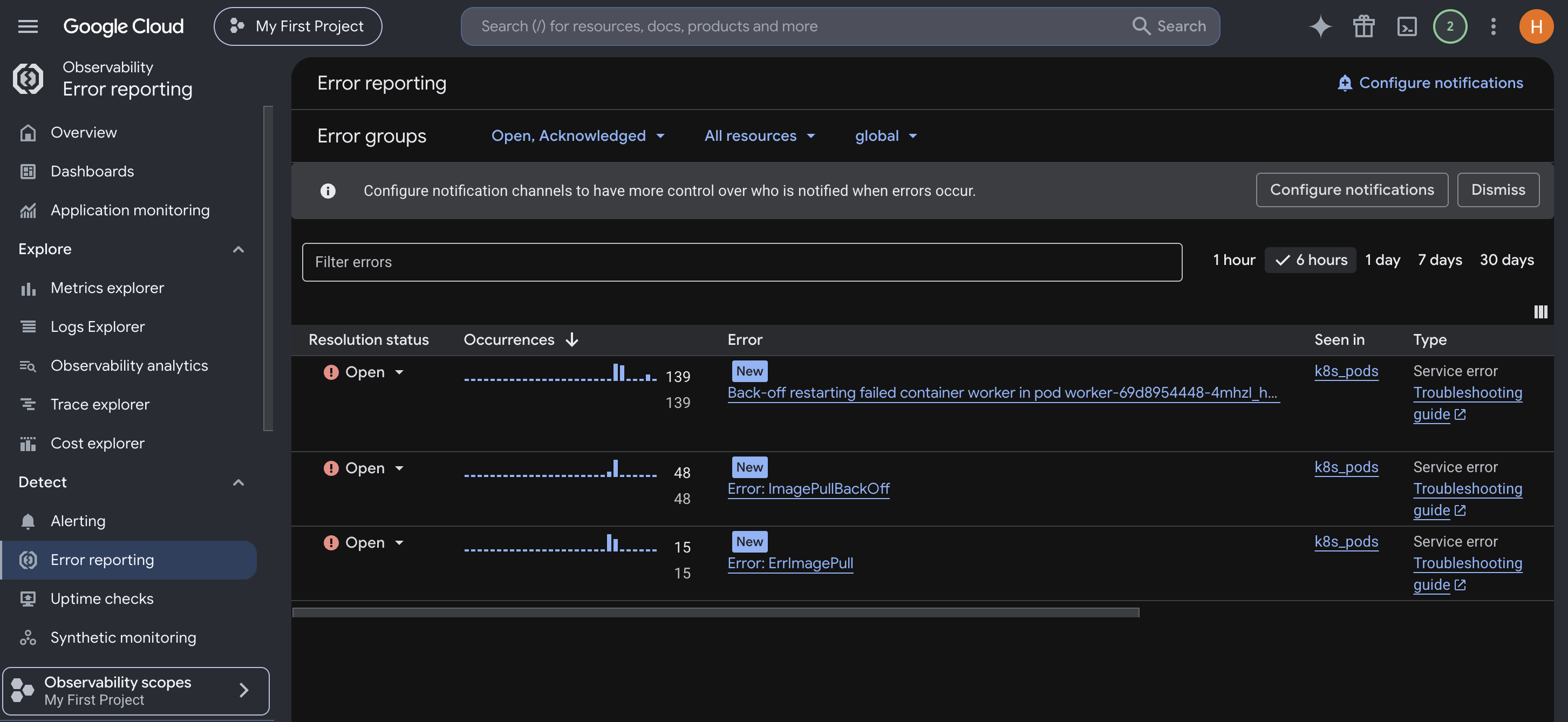
GCP Error Reporting: ImagePullBackOff and ErrImagePull on k8s pods after the cluster could not pull from Artifact Registry.
Cause: GKE node service account cannot pull from Artifact Registry.
Fix: Grant roles/artifactregistry.reader on the repo to the compute default SA:
gcloud artifacts repositories add-iam-policy-binding hello-gke \
  --location=us-central1 \
  --member="serviceAccount:PROJECT_NUMBER-compute@developer.gserviceaccount.com" \
  --role="roles/artifactregistry.reader"
Replace PROJECT_NUMBER with your project number. Also double-check each service tag in environments/dev/*-values.yaml matches an image that exists in GAR (frontend, api, and worker are separate images).
exec format error (ARM image on amd64 nodes)
Symptom: CrashLoopBackOff, container exits immediately. kubectl logs --previous shows:
exec /server: exec format error
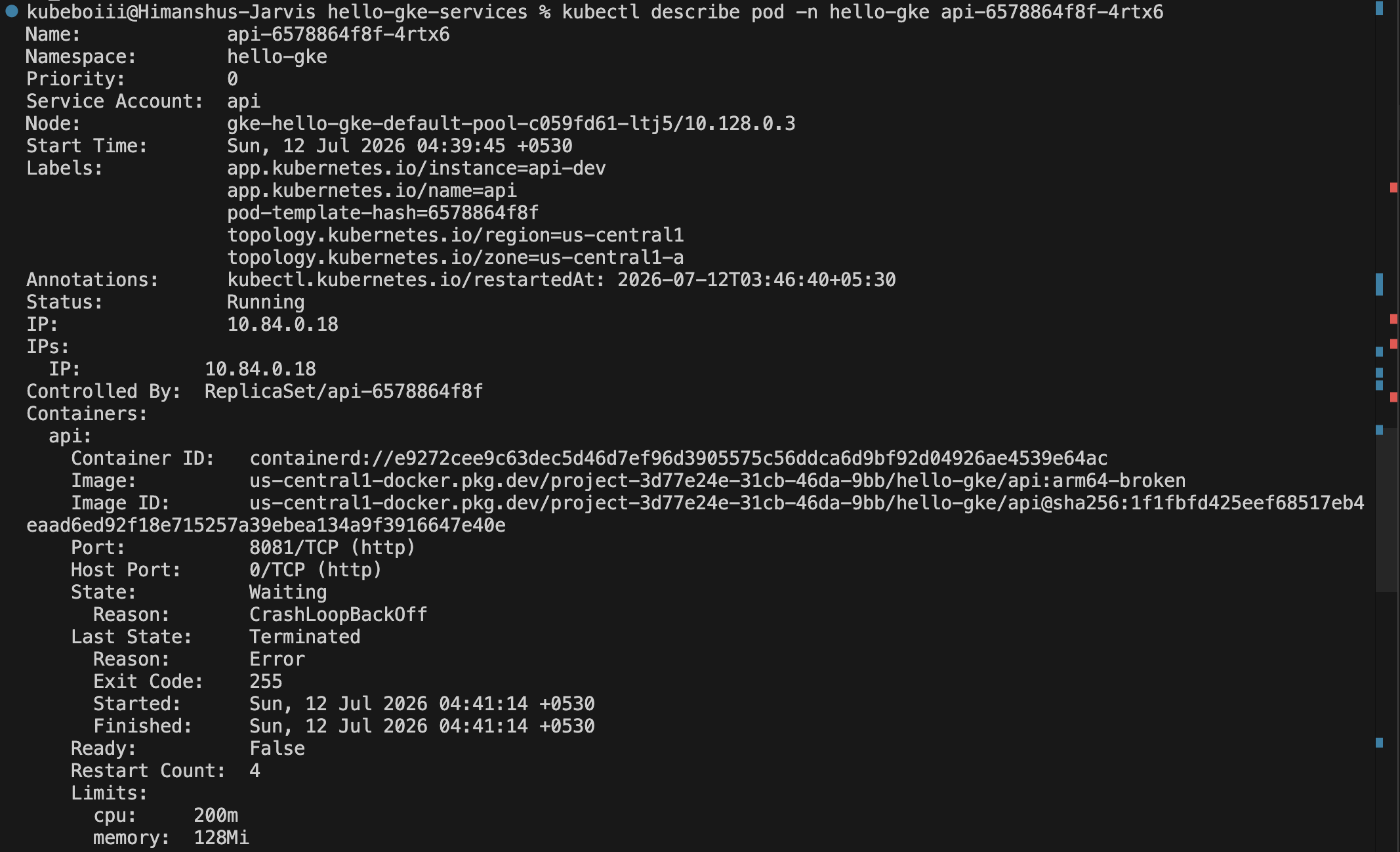
Pod on image arm64-broken: CrashLoopBackOff, exit code 255, waiting state.

kubectl logs --previous: the kernel cannot execute an arm64 binary on amd64 nodes.
Cause: docker build on a Mac without --platform linux/amd64 produces an arm64 binary. GKE nodes run amd64. The kernel literally cannot execute the binary.
Fix:
docker build --platform linux/amd64 -t REGISTRY/api:TAG services/apiVerify locally if you want to be sure:
docker image inspect REGISTRY/api:TAG --format '{{.Architecture}}'
docker image inspect confirms the image was built for arm64 on Apple Silicon.
Use a new tag when you push the fixed image. Nodes cache images when imagePullPolicy: IfNotPresent (the default in many charts). Re-pushing dev under the same tag does not always pull fresh layers.
GCE Ingress wants a Host header
Symptom: curl http://<INGRESS_IP>/ returns 404. Pods are fine. Argo is green. Confusing if you expect the IP alone to route somewhere.
Cause: The Ingress rule matches hostname hello-gke.dev.example.com, not the bare IP. HTTP requests include a Host header; GCE uses it to pick a backend.
Fix:
curl -s -H "Host: hello-gke.dev.example.com" http://<INGRESS_IP>/ | jqYou get JSON from the frontend with a nested api payload. Without the Host header, GCE has no matching rule. That is normal for host-based ingress, not a bug in your app.
If you are used to nginx Ingress with a default backend, this feels wrong. It is just how the GCE controller routes.
GitOps image update
Changing app behavior without kubectl edit: code change in the services repo, new image tag, values bump in the gitops repo, git push.
The full two-repo flow in one pass:
- hello-gke-services: change code, build image, push new tag (e.g.
v2) - hello-gke-gitops: set
tag: v2inapi-values.yaml, pushmain - Argo CD re-renders the chart and rolls the Deployment
curlwith the Host header shows the newapi.messagein JSON
Rollback is the same pattern in reverse: revert the values commit or set tag: dev in git. Argo follows. No kubectl rollout undo required if git is your source of truth.
The api handler is the easiest place to see a visible diff. Frontend proxies it, so the outer JSON changes when api changes.
1. Change the API handler
In hello-gke-services/services/api/main.go:
router.GET("/api/hello", func(c *gin.Context) {
    c.JSON(http.StatusOK, gin.H{
        "service": "api",
        "message": "Hello from API v2",
    })
})
Previously it returned "Hello from API" on the dev tag.
2. Build, push, update Git
docker build --platform linux/amd64 \
  -t us-central1-docker.pkg.dev/my-gcp-project/hello-gke/api:v2 \
  services/api
docker push us-central1-docker.pkg.dev/my-gcp-project/hello-gke/api:v2
In environments/dev/api-values.yaml in the gitops repo:
image:
  repository: us-central1-docker.pkg.dev/my-gcp-project/hello-gke/api
  tag: v2
Argo only reads the gitops repo for rollout config. The v2 image already contains the new handler. Commit and push both repos: hello-gke-services for the code change, hello-gke-gitops for tag: v2.
3. Watch Argo sync
Argo polls git on an interval (and on webhooks if you set them up). When it sees the new commit, it re-renders the Helm chart and updates the Deployment. You should see a new ReplicaSet and a pod on the v2 image.
api-dev should show the new revision and stay Healthy:
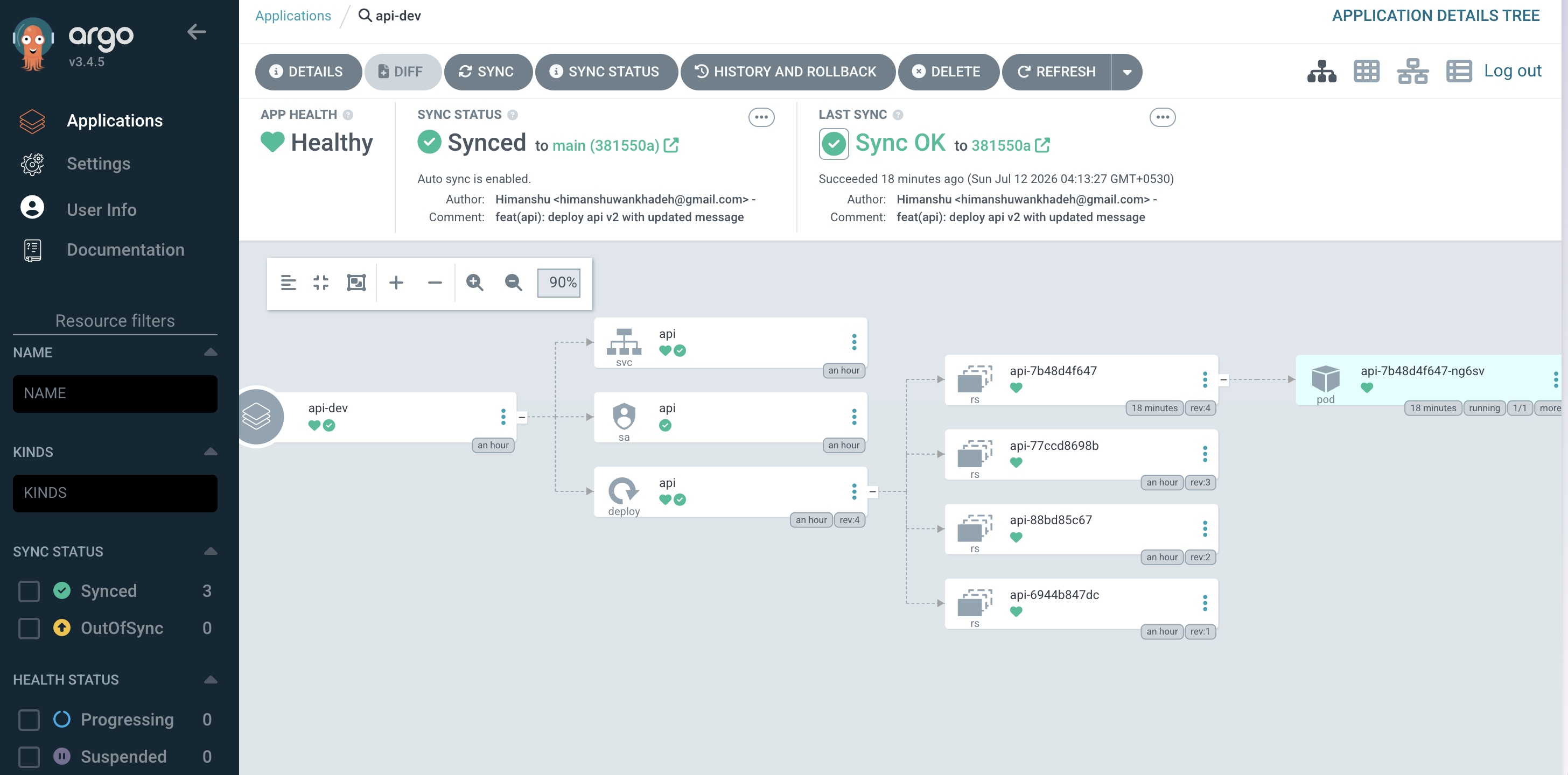
api-dev synced to feat(api): deploy api v2 with updated message with a healthy pod on the new ReplicaSet.
If the UI looks stale after a push, hard refresh:
kubectl patch application api-dev -n argocd \
  -p '{"metadata":{"annotations":{"argocd.argoproj.io/refresh":"hard"}}}' \
  --type merge
If the JSON response does not change after a rebuild, Docker probably served cached layers. Rebuild with --no-cache or bump to v3.
4. Verify from outside the cluster
Same curl both times:
curl -s -H "Host: hello-gke.dev.example.com" http://<INGRESS_IP>/ | jqBefore (image tag dev):
{
  "service": "frontend",
  "message": "Hello from frontend",
  "api": {
    "service": "api",
    "message": "Hello from API"
  }
}
Before: api.message is Hello from API on image tag dev.
After (v2 + updated handler):
{
  "service": "frontend",
  "message": "Hello from frontend",
  "api": {
    "service": "api",
    "message": "Hello from API v2"
  }
}
After: api.message is Hello from API v2 on image tag v2.
The nested api.message field is the proof GitOps worked. No kubectl involved in the rollout itself. Git was the deploy button.
Verification checklist
Run these when you think you are done:
# Argo CD apps
kubectl get applications -n argocd
# Expected: api-dev, frontend-dev, worker-dev - Synced, Healthy

# Workloads
kubectl get pods -n hello-gke
# Expected: api, frontend, worker - Running

# Ingress
kubectl get ingress -n hello-gke
# Expected: ADDRESS populated

# End-to-end
curl -s -H "Host: hello-gke.dev.example.com" http://<INGRESS_IP>/ | jq
# Expected: JSON with nested api payload

# Image tag on api
kubectl get deploy api -n hello-gke -o jsonpath='{.spec.template.spec.containers[0].image}{"\n"}'
# Expected: .../api:v2 if you ran GitOps image update, or .../api:dev if you stopped after Setup
Cleanup
gcloud container clusters delete hello-gke --zone us-central1-aA two-node e2-medium cluster left running will show up on your bill. Delete it when the lab is over.
Hit a fifth pitfall running this lab? Open an issue on the gitops repo with the symptom and the Events block from kubectl describe pod.
Git as source of truth sounds clean until a path typo, a missing IAM binding, or an arm64 image ruins your afternoon. None of that is exotic. It is just the gap between a README and a cluster that actually runs.